The short answer
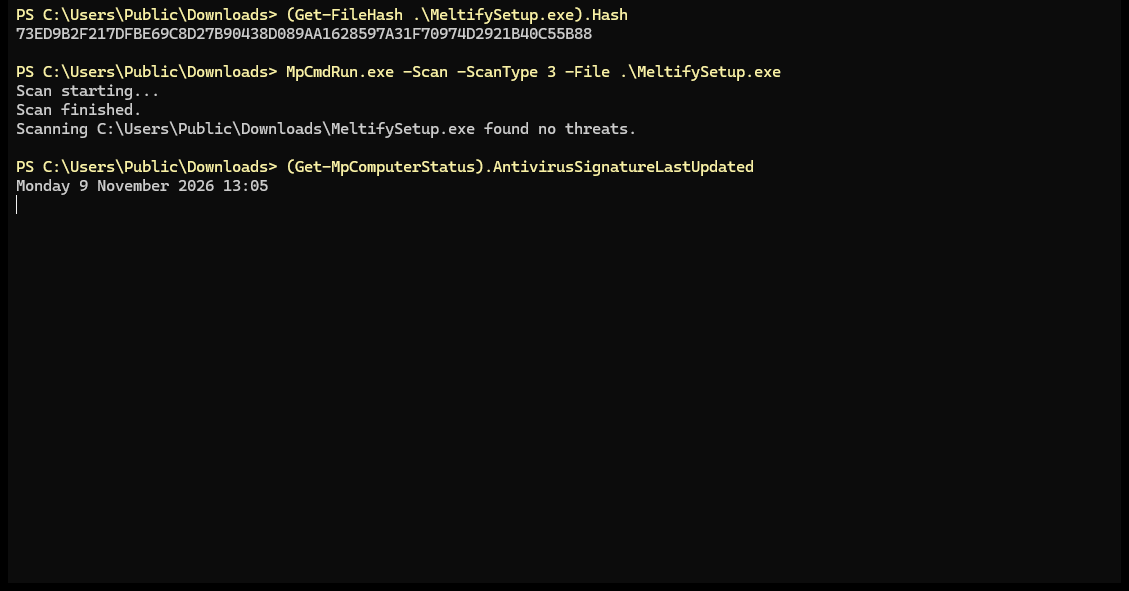
- Microsoft Defender found no threats in the Windows download (MeltifySetup.exe, version 1.7.2) on 9 November 2026, with virus definitions from 9 November.
- The Android app asks only for ordinary permissions: internet, playing in the background and notifications. It doesn't ask for your contacts, messages, call log, photos, files, location, camera or microphone, so it can't see them.
- On Windows it installs without administrator rights, only in your own user folder.
- No account, no ads, no trackers. Your music library stays on your device. The privacy page has the details.
- Not sure yet? Use the web player: nothing to install.
Why Windows, Android or a Mac shows a warning
Apps from big companies come with a paid digital signature (code signing). It costs hundreds of dollars every year, and Meltify is free, so its apps aren't signed yet. Without that signature, every system warns about a new app, even a safe one. The warning means the system doesn't recognise the app, not that it found anything harmful.
- Windows shows a blue box, "Windows protected your PC" (Microsoft Defender SmartScreen), with "Unknown publisher". Press More info, then Run anyway.
- Android asks you to allow installing apps from your browser. It asks this for every app that doesn't come from the Play Store, and Meltify can't be there: Google's rules don't allow apps that save music from YouTube. Tap Settings and turn on Allow from this source.
- A Mac says it can't check the app, because that check needs Apple's yearly fee. Press Done, open System Settings, then Privacy & Security, scroll down and press Open Anyway. Once is enough.
When Windows Security really finds a virus, it blocks the file and tells you so. It doesn't offer a Run anyway button.
Check that your download is exactly ours
Every file has a fingerprint: a SHA-256 code worked out from every byte of it. If anything in the file changed, the fingerprint would change completely. These are the fingerprints of the current downloads:
| File | Version | SHA-256 fingerprint |
|---|---|---|
| MeltifySetup.exe (Windows) | 1.7.2 | 73ed9b2f217dfbe69c8d27b90438d089aa1628597a31f70974d2921b40c55b88 |
| Meltify.apk (Android) | 1.7.2 | c34089dd73c612e6164882adf5441ee2d18b426b147cccf363556fe4a77d36fa |
| Meltify.dmg (Mac) | 1.7.1 | 023e583980d4a82783481ee793a4dd0485a145a01fb0c65b24402c815e05c31a |
On Windows: open your Downloads folder, right-click an empty spot and choose Open in Terminal (on Windows 10: Shift + right-click, Open PowerShell window here), then type Get-FileHash .\MeltifySetup.exe. The code it shows should be the one above (capital letters or not doesn't matter).
On a Mac: open Terminal and type shasum -a 256 ~/Downloads/Meltify.dmg.
Scan it yourself: on Windows, right-click the file and choose Scan with Microsoft Defender (on Windows 11, press Show more options first).
What the apps can reach
Android
These are all the permissions in Meltify.apk 1.7.2, read from the app file itself:
INTERNET: to play and download musicACCESS_NETWORK_STATE: to notice when you're offlineWAKE_LOCK: so music keeps playing with the screen offFOREGROUND_SERVICEandFOREGROUND_SERVICE_MEDIA_PLAYBACK: so music keeps playing when you switch appsPOST_NOTIFICATIONS: the play and pause controls in your notificationsRECEIVE_BOOT_COMPLETED: added by AndroidX WorkManager, Google's standard library for background jobs, so they carry on after a restartapp.meltify.player.DYNAMIC_RECEIVER_NOT_EXPORTED_PERMISSION: Meltify's own lock, added by AndroidX, so only Meltify can send messages to parts of itself. It opens nothing on your phone
On Android 13 and newer, Settings › Apps › Meltify › Permissions shows a single one: Notifications.
Windows
The installer doesn't ask for an administrator password. Meltify goes into your own user folder, AppData\Local\Programs\Meltify, and runs with your normal rights, so it can't change Windows itself or other people's accounts on the PC.
Where it connects
- YouTube Music: finds and plays the songs (covers come from YouTube's image server)
- NetEase, Kugou and LRCLIB: the lyrics
- Spotify, Apple Music, Deezer and SoundCloud: only to read a playlist link you paste
- Google Translate: only if you turn on lyrics translation
- getmeltify.vercel.app (meltify.pages.dev is the same site): new-version checks, Listen together and shared links
- Only when you use them: Ultimate Guitar for chords, Last.fm if you link it, and the one-time Sing add-on download on Windows
No ad networks, no trackers, no analytics. The privacy page says what each online feature keeps.
Only download it from here
The real downloads are on getmeltify.vercel.app. We don't put Meltify anywhere else, so a copy from another website could have been changed, and its fingerprint wouldn't match the ones above.
Who makes it
Meltify is made by dev-joshua-py (github.com/dev-joshua-py) and is on TikTok as @meltifymusic. Questions about any of this are welcome there.
Get Meltify
Free for Windows, Mac and Android. Or start with the web player, with nothing to install.