What you get for free
- Your Spotify playlists, in full. Paste a public playlist link and every song comes in, even playlists with hundreds of songs. No Spotify account and no Premium needed.
- Offline listening. Press Download on a song or a whole playlist. It's saved as an M4A file with its cover and plays with no connection.
- No ads in the apps, and no account to make.
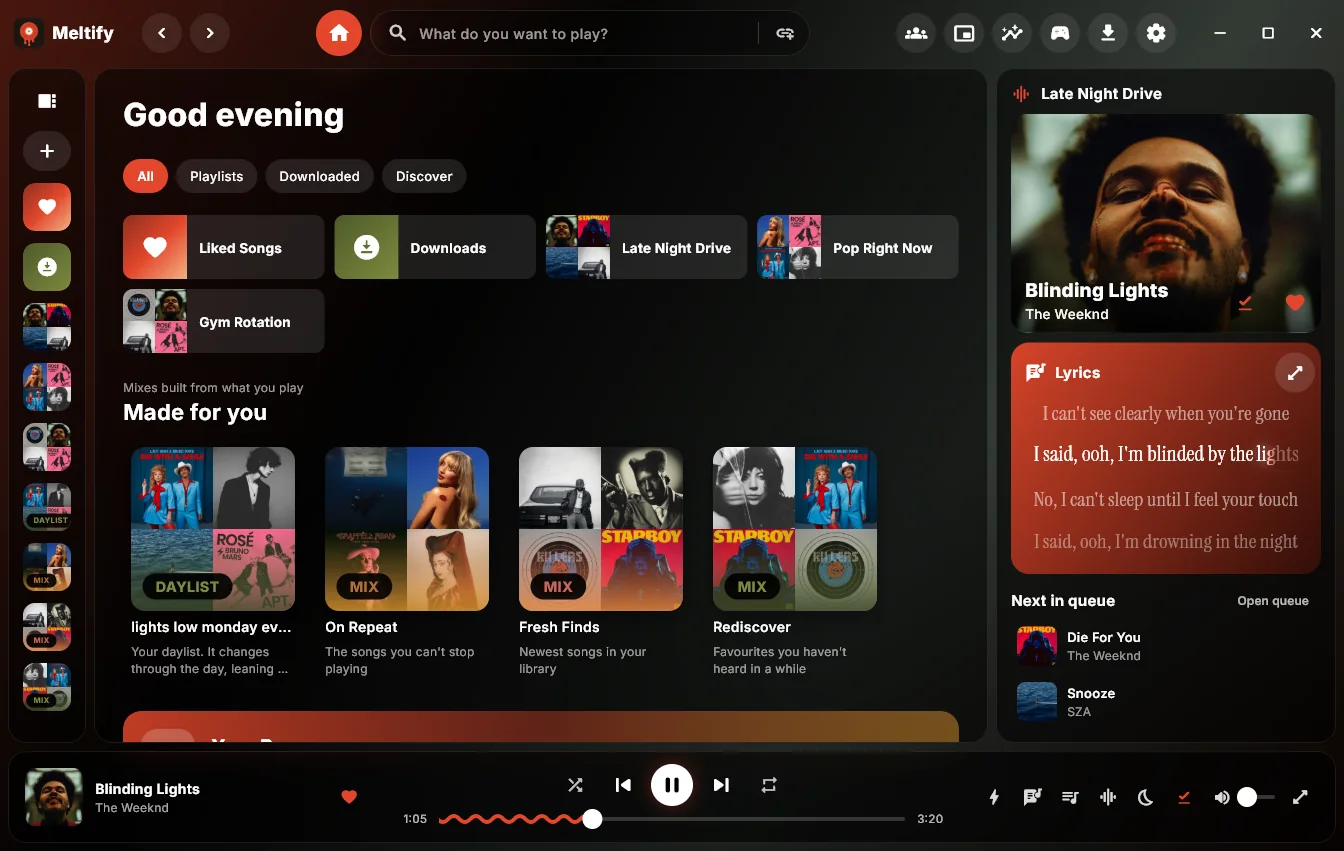
- Lyrics that light up letter by letter, in five styles, timed to the word where the song has word timing.
- Listen together with friends in a room, made-for-you mixes, a daylist, a listening recap and your year in music.
- Every device: Windows, Mac, Android, and a web player for anything else.
Move your Spotify playlists over
- In Spotify, open a playlist, press Share and Copy link.
- In Meltify, open Import and paste the link. You'll see the playlist and its songs.
- Press Save & download all to keep everything offline, or Save to library to stream it first.
Your own private playlists and Liked Songs need your Spotify account: connect it once in Settings.
Good to know
- Meltify finds each song on YouTube Music (title, artist and length), so the sound comes from there.
- It isn't in app stores: store rules don't allow apps that save music from YouTube. You download it from its website.
- The web player plays through YouTube's own player, so it can't keep songs offline, and on a phone it stops when the screen locks. The apps don't have those limits.
Get Meltify
Free for Windows, Mac and Android. The web player opens the same links with nothing to install.